

Observability Plugin
The Observability Plugin makes Module Federation loading observable. It records
runtime loading events, summarizes the final result, prints a stable
traceId when loading fails, and can correlate runtime failures with build
information.
The plugin is designed for Module Federation 2.5.0 and later. If a project is
on an older MF version, runtime error codes still help with basic
troubleshooting, but the richer report and loading observability workflow
requires upgrading to 2.5.0+ and enabling this plugin.
Use it when you want to answer questions such as:
- Did this remote load successfully?
- Which phase failed: manifest, remoteEntry, init, expose, factory, or shared?
- Did the load recover through a runtime fallback or recovery path?
- Which shared dependency provider and version were selected?
- Did
preloadRemoteactually finish loading its resources? - What report should I give to a human or AI coding agent?
Shared observability is scoped to the MF instance. It tells you which MF
instance loaded a shared dependency, which registered provider/version was
selected, and the related scope, version, and eager configuration. It does not
guarantee a causal link from that shared dependency back to a specific
remote/expose. When a flow involves multiple shared dependencies, inspect all
phase: "shared" events. summary.shared is only the last observed shared
summary.
If the build plugin supplies customShareInfo but no registered shared
provider matches it, this is not always a fatal error. The report describes the
handled path as summary.outcome: "recovered",
summary.phases.shared.status: "complete", and
shared.reason: "custom-share-info-unmatched". It means the runtime continued
through a recoverable path. Inspect shared configuration only if you expected a
specific provider/version to be selected.
Preload observability answers whether preloadRemote actually finished loading
its resources. After preloadRemote completes, reports include
phase: "preload" resource results with the resource URL, resource type,
status, and preload id. Status can be success, error, timeout, or
cached. When the call does not specify exposes, the id is remoteName/*.
When exposes are provided, each expose is recorded separately as
remoteName/expose.
If you want to try the report workflow first, or inspect and export reports
directly from the page, install the latest
Module Federation Chrome extension.
The Loading Trace tab reads reports from the page's own observability plugin.
If the page has not installed the plugin, the extension can also start temporary
collection for the current tab. See
Chrome Devtool Loading Trace
for the full workflow.
Install
Browser Runtime
Use the default entry in browser runtime code.
When a Module Federation load fails, the plugin prints a compact
console.error hint:
Run the read: command in the browser console to get the full report.
You can also read reports directly:
If you want to observe loading chains in development, or if the page stays in a loading state before any error is printed, enable the browser reader. Development browser mode prints start logs by default:
The plugin prints console.info only when loadRemote or loadShare starts.
The line includes the traceId and read command. Agents can use that traceId
to inspect the current report, including status: "pending",
summary.phases, updatedAt, and duration. Set trace.printStart: false to
disable it in development browser mode. In production browser mode, start logs
are disabled by default and require trace.printStart: true.
Production Runtime
In production, avoid exposing a public browser reader by default. Keep console output small and upload reports through your own system.
In production browser mode, the console hint only contains traceId and known
errorCode. The full report should come from onReport, exportReport(), or
your own telemetry backend.
Analyze Reports from onReport
onReport is called whenever a report is updated. Production apps usually do
not need to store every successful report, but this callback is the right place
to upload failures, recovered paths, or selected successful loading chains to
your own system.
Common strategies:
- Troubleshooting only: upload
report.status === "error"andreport.summary.outcome === "recovered". - Shared dependency auditing: also upload
report.summary.outcome === "shared-resolved"so you can see which provider and version were selected. - Preload result auditing: also upload
report.summary.outcome === "preloaded"or failedphase: "preload"events to count successful, failed, timed out, and cached preload resources. - Full loading observability: sample successful
runtime-loaded,component-loaded, andshared-resolvedreports.
After you have a report, read it in this order:
diagnosis: owner hint, key facts, and suggested next actions.summary: final result.runtime-loadedmeans the remote loaded,component-loadedmeans business code reported readiness,shared-resolvedmeans a shared provider/version was selected,preloadedmeans preload resources completed,failedmeans loading failed, andrecoveredmeans the runtime continued through a recoverable path.remote/shared: the current load target. For shared reports, inspectprovider,requiredVersion,selectedVersion, andavailableVersions.moduleInfo: deployment-provided module information, useful for snapshot matching issues.events: the ordered timeline, useful for finding the phase that got stuck.
Example:
You can give the uploaded report to an AI coding agent:
Observe Module Federation with Divebell
For a one-off live page investigation, first install the MF Extension manually on the agent machine. Divebell can then enable the diagnostics provided by the Extension before navigation. You do not need to add the Observability Plugin to the application:
An AI coding agent should first read the CLI Skill returned by
divebell skill and the Extension Skill returned by
divebell mf --skill. It can then inspect current MF state, loading traces,
Shared selection, Bridge operations, or module performance. For example:
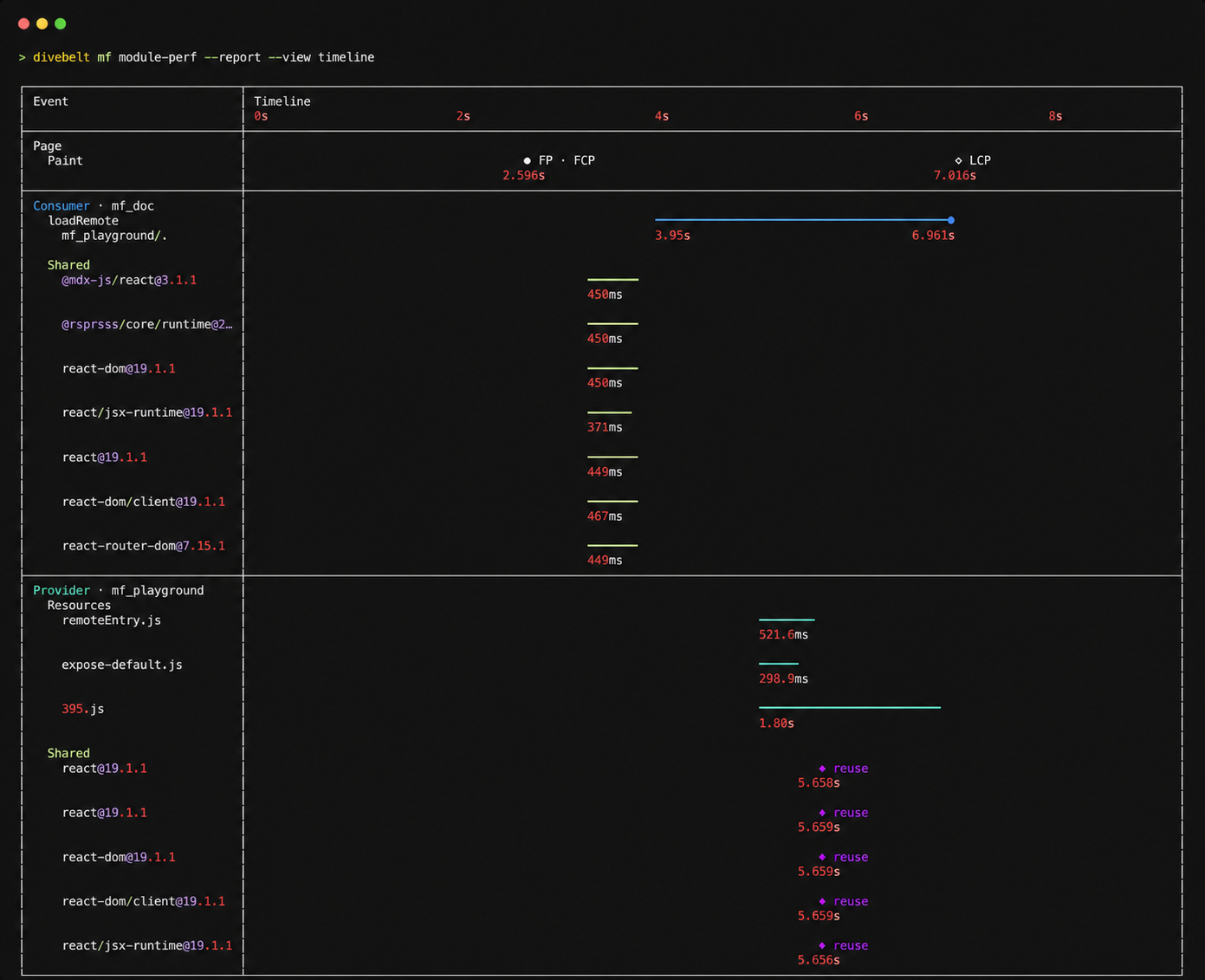
See the Divebell MF Extension documentation for the complete command surface, or follow Troubleshoot Runtime Issues.
Keep the application Observability Plugin when reports must be collected continuously, retained, or uploaded from production.
Runtime Options
ObservabilityPlugin(options) supports these runtime options:
Node or SSR Runtime
Use the Node entry when you want local report files.
The Node entry writes:
.mf/observability/latest.json: latest complete report.mf/observability/events.jsonl: event stream for multiple traces
Read latest.json first. Use events.jsonl only when you need ordering or
multiple traces.
Build Observability
Add the build plugin next to your Module Federation build plugin when you want separate build-side evidence.
Build observability can write:
.mf/observability/build-info.json.mf/observability/build-report.json
Runtime reports do not embed these files. When debugging needs build evidence, read the build file separately and compare it with the runtime report.
Mark Business Success
Module Federation can know that a remote module loaded. It cannot always know that your business component finished its own data loading, chart rendering, or SDK initialization.
When react.injectLoadedCallback is explicitly enabled, the plugin injects an
onMFRemoteLoaded prop into matched remote React components. The producer can
call it when its own ready condition is met:
Consumer-side code can still call the instance method directly when needed:
The report will include component:business-loaded and
summary.outcome: "component-loaded".
Inject React Loaded Callback
For development, AI debugging, or temporary production debugging, you can explicitly inject a loaded callback into matched remote React components:
When enabled, the plugin tries to detect remote React function components after
loadRemote succeeds and wraps them with a component that does not add DOM
nodes. The wrapper injects only the onMFRemoteLoaded prop. It does not observe
React mount, render lifecycle, or timeout. When the producer calls
props.onMFRemoteLoaded?.(), the report records component:business-loaded.
If summary.componentLoaded is false after enabling
react.injectLoadedCallback, first check whether the producer source actually
calls props.onMFRemoteLoaded?.(...). If it does not, the report can only prove
that the remote resource loaded; it cannot prove whether the component reached
the producer's business-ready point. If the producer source is unavailable, ask
the producer owner to confirm whether the callback was added.
This option changes the component reference because loadRemote returns a
wrapper component. Use remoteIds to keep the matched scope narrow, and remove
this option after the production issue is fixed.
Use With the mf Skill
Install the skill:
When the console prints an observability hint, ask your agent:
If you are in Node or SSR, give the agent the file path instead:
If your production app uploads reports, give the uploaded report or traceId
to the agent:
What the AI Reads First
The skill reads fields in this order:
diagnosissummarymoduleInfoevents
If build-side evidence is needed, read .mf/observability/build-info.json or
.mf/observability/build-report.json as a separate file.
Reports omit undefined fields. If a field is absent, treat it as not observed
or not relevant for this trace.