

Tree shaking compartilhado
Ao usar Module Federation, nós often compartilhe comum dependências (such as antd, React, etc.) por meio do shared configuração para reduce bundling duplicado e keep dependência versões consistent across aplicações. However, o classic shared mechanism has uma downside: it always fornece uma ferramenta full dependência bundle, even se your aplicação apenas usa uma small portion de it (por exemplo, apenas o Button componente de antd).
Este pode lead para:
- Large build artifacts: unnecessary code é bundled, increasing o final output size.
- Runtime overhead: o navegador downloads e executes mais JavaScript than needed, slowing down page carregue e render.
Tree shaking compartilhado é designed para solve este. It analyzes your code, precisely identifies que exporta são actually usado, e bundles apenas esse subset. As uma result, your aplicação pode consuma um optimized, smaller dependência compartilhada.
- Smaller output size: reduces unnecessary code at o source.
- Faster carregamento: users download apenas o que they need.
- Better runtime performance: menos JavaScript para parse e execute.
Início rápido
Enabling Tree shaking compartilhado é straightforward: adicione o treeShaking opção em your configuração.
Exemplo
Local verification
Depois building locally, check o output size e o exported content do dependência compartilhada (e.g. antd). O expected result é esse it apenas contains o módulos você actually use.
Configuração
O core opção é sharedItem.treeShaking. Você pode também control onde Tree Shaking artifacts são generated via:
- treeShakingDir
- injectTreeShakingUsedExports
- treeShakingSharedPlugins
- treeShakingSharedExcludePlugins
Modes
There são two modes para fit diferente team setups e projeto scales.
runtime-infer
runtime-infer é uma lightweight estratégia esse does não require uma centralized service.
- Habilite: definir
modepararuntime-infer. - Best for:
- local desenvolvimento e quick validation,
- teams sem uma implantação ou CI service,
- smaller projetos com uma single consumer.
- How it works: em runtime, se o current page’s needs são já satisfied por uma previously carregado, tree-shaken shared bundle, it reuses it. Caso contrário, it falls back para carregamento o full dependência bundle para garantir correctness.
- Improving hit rate: sem uma global view, o reuse rate de
runtime-infermay ser limited. Você pode manually augment ousedExportslist em your configuração para pre-declare módulos você may need, guiding o compiler para gerar uma mais suitable shared bundle e improving reuse.
servidor-calc
server-calc é o strongly recomendado best practice. It leverages uma centralized service para maximize o benefits de Tree Shaking e achieve uma global optimum.
Deploy Server (reference implementation)
If you plan to build your own Deploy Server, the following high-level flow can be used to implement server-calc.
1. Aggregate usedExports during deployment
In your CI/CD deployment pipeline, your service should:
- collect build metadata for all applications about to be released (typically
mf-stats.jsonor similar files); - for the same shared dependency (e.g.
antd@6.1.0), aggregate theusedExportsdeclared by each application.
2. Compute the global minimum union
Merge and deduplicate all collected usedExports lists to get the minimal global set (the union) required by the system.
3. Run a secondary build to produce the optimized shared bundle
Invoke your build tool (e.g. Rspack CLI) as an isolated build and pass:
- the target shared dependency name and version (e.g.
antd@6.1.0); - the global
usedExportsunion from the previous step. The output is a standalone shared bundle containing only the required modules.
4. Update and publish the Snapshot
Upload the optimized bundle to your static asset host (CDN). Then update the Module Federation Snapshot file (typically the remote version of mf-manifest.json) with fields such as:
secondarySharedTreeShakingEntry: URL of the optimized bundle,secondarySharedTreeShakingName: unique bundle name,treeShakingStatus: mark as available.
Finally, distribute the updated Snapshot to all consumers.
5. Runtime on-demand loading
When a user visits the application, the MF Runtime reads the Snapshot. If treeShakingStatus is available and the environment meets the loading conditions, it loads the optimized bundle via secondarySharedTreeShakingEntry instead of the full bundle.
- Strict versioning is the foundation. Ensure secondary builds and runtime loading are based on the exact same version (e.g.
antd@6.1.0) to avoid mismatches. - Use a reasonable caching strategy for secondary build artifacts. Since content changes with the global
usedExports, prefer content-hash-based filenames for long-term caching. - This flow is forward compatible: when not enabled or conditions aren't met, consumers fall back to the full bundle without impacting existing functionality.
Validation e rollback
How para confirm Tree Shaking é working?
- Network panel check: no navegador DevTools Network panel, filter carregado JS arquivos. Confirm o carregado arquivo é o secondary build artifact (typically containing identifiers like
secondaryou uma hash) rather than o original full bundle. Its size deve ser significantly smaller. - Inspect bundle contents: download o carregado dependência compartilhada JS arquivo e search for exporta você did não use (e.g. você apenas usado
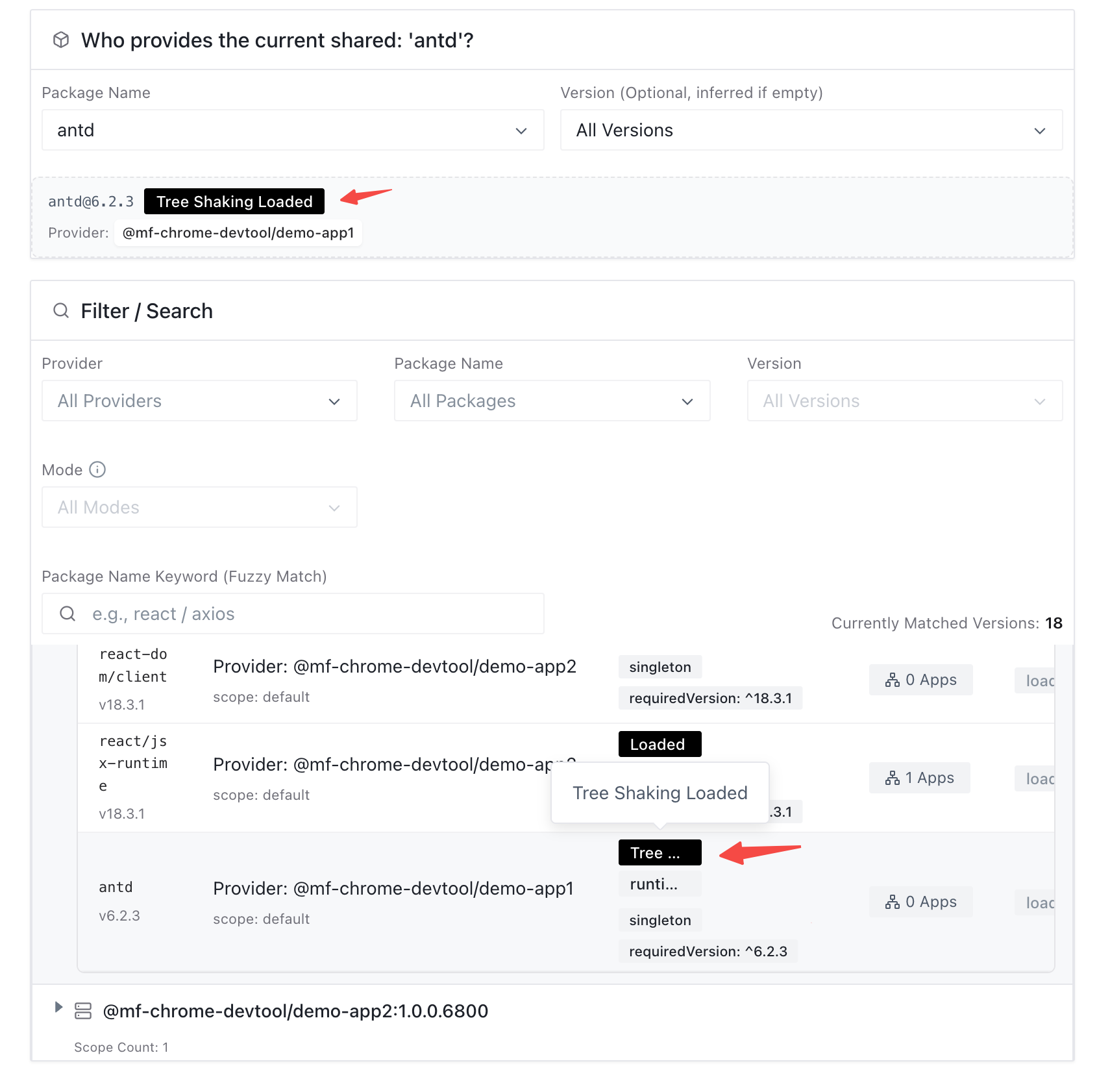
Button, so search forModal). Se they’re não present, they were successfully shaken out. - Chrome DevTools verification: em Chrome DevTools, open o “Shared” panel e select o target dependência compartilhada. Check its status tags:
Tree Shaking Loadedmeans Tree Shaking é effective e o trimmed artifact é carregado;Loadedmeans it fell back para carregamento o full bundle;Tree Shaking Loadingmeans it’s carregamento via o Tree Shaking caminho.
How para safely roll back?
Shared dependência Tree Shaking é designed com um automatic safe fallback. Se o runtime detects issues (Snapshot não delivered, network erros, versão mismatch, etc.), it defaults para carregamento o full dependência compartilhada bundle para keep a aplicação stable.
Se você precisa disable it manually, stop o secondary-build e Snapshot-update steps em your serviço de implantação.
Producing a secondary tree-shaken shared artifact
If your goal is “tree-shake a shared dependency for a single application”, usedExports is usually enough.
This section is about generating a standalone secondary artifact that can be loaded at runtime on demand, and can be distributed or reused from the deployment side.
This process builds only shared dependencies; remotes will not take effect. The original project entry is automatically ignored during the build, and only shared modules are bundled.
Non-Modern.js projects
Use TreeShakingSharedPlugin in your build configuration, set secondary: true, and reuse your existing mfConfig.
Modern.js projects
When using @module-federation/modern-js-v3, enable secondarySharedTreeShaking: true in the plugin options to generate the secondary artifact.
FAQ
1. Can Tree shaking compartilhado ser usado com eager: true?
No. eager: true bundles dependências compartilhadas no initial chunk, que conflicts com o on-demand carregamento model obrigatório by Tree Shaking. Você deve choose entre them:
- Se o dependência compartilhada é small e você want o fastest possible initial carregue, consider
eager: true. - Se o dependência compartilhada é large (e.g. um componente library), disable
eagere use Tree Shaking for significant size e performance gains.
2. What deve I watch out for com singleton dependências em runtime-infer?
Be careful. Se uma dependência compartilhada é configured as singleton: true (deve ser globally singleton), você may hit scenarios like:
- App A usa apenas
antd/Buttone carrega its own tree-shaken bundle. - App B usa
antd/Modale carrega its own full bundle.
Este pode result em two diferente antd instances no mesmo page (uma minimal one e uma full one). Esse breaks o singleton constraint e may cause style conflicts, non-shared estado, ou even crashes.
Recommendation: for libraries esse deve remain singleton, prefer server-calc so all consumers carregue o mesmo globally optimized bundle. Se você deve use runtime-infer, expand usedExports para make o produced bundle mais complete e reduce o risk de conflicts.
3. What são o prerequisites for Tree Shaking para work?
It primarily depends no bundler’s static analysis. Your code deve use ES Módulos (import/export) so o compiler pode determine que exporta são usado. CommonJS (require/module.exports) módulos typically cannot ser tree-shaken effectively.
4. Will este break dependências compartilhadas for já released projetos?
No. O dados source e carregamento caminho for Tree Shaking são isolated do existente shared mechanism, e there são strict hit conditions e safe fallback behavior. It does não affect stable legacy projetos.